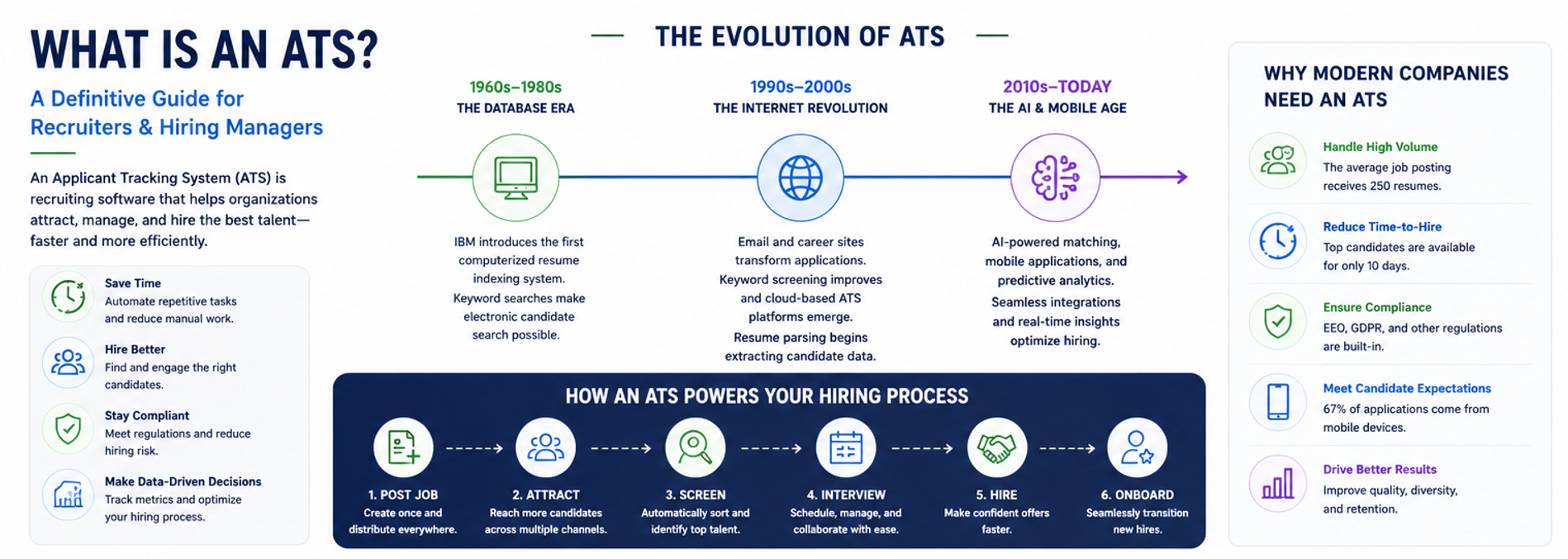

With 75% of recruiters now using an application tracking system (ATS) and 99% of Fortune 500 companies relying on this technology, the question isn’t whether you need one but rather which one to choose. The average corporate job opening attracts 250 resumes, making manual hiring increasingly impractical and error-prone. Companies using an ATS report cutting time-to-hire by approximately 20%, thanks to streamlined workflows and automation.

As the global ATS market is poised to grow from $2.47 billion in 2025 to $3.84 billion by 2030, selecting the right platform has become a crucial business decision. This guide walks you through a proven framework for evaluating, comparing, and selecting an ATS that aligns with your hiring goals and organizational needs.
Why an ATS Matters
An applicant tracking software system fundamentally transforms how organizations approach talent acquisition by centralizing the entire recruitment funnel, from initial job posting through final hiring decisions. Rather than juggling spreadsheets, emails, and disparate systems, recruiters gain a single command center for all hiring activities.
The power of hiring automation extends beyond simple organization. Modern ATS platforms automate repetitive tasks that consume countless recruiter hours: resume parsing, candidate communication, interview scheduling, and application status updates. This automation not only saves time but also ensures consistency and reduces the likelihood of candidates falling through the cracks.
Perhaps most importantly, an ATS delivers the analytics needed for continual optimization. Real-time dashboards reveal bottlenecks in your hiring process, highlight your most effective sourcing channels, and track key metrics like time-to-fill and cost-per-hire. These insights enable data-driven decisions that improve candidate experience while reducing recruitment costs.
Additionally, robust ATS platforms enhance compliance and data security, critical considerations given the growing prevalence of privacy regulations and the sensitive nature of candidate information. By centralizing data storage and standardizing processes, organizations can more easily maintain audit trails and ensure consistent, fair hiring practices.
Adopt a Buyer Mindset Before You Shop
Purchasing an ATS requires the same strategic approach as any critical software investment. Start by forming a cross-functional buying team that includes HR, IT, hiring managers, and finance representatives. This diverse group ensures all perspectives are considered and increases buy-in across the organization.
Next, clearly define your must-have versus nice-to-have requirements. Must-haves might include specific integrations, compliance features, or scalability needs. Nice-to-have features could include advanced analytics or AI-powered matching capabilities. This distinction prevents feature creep and keeps your evaluation focused.
To build a business case for ATS investment, quantify your ROI drivers. Calculate current costs in recruiter hours spent on manual tasks, recruitment agency fees, and lost productivity from extended vacancies. Compare these against the ATS investment to demonstrate potential savings in time, costs, and improvements in quality of hire.
Set a realistic evaluation timeline, typically 60-90 days for a thorough assessment, and establish your budget parameters upfront. Remember to account for implementation costs, training, and potential integration expenses beyond the base subscription fee. This preparation positions you for productive vendor conversations and prevents costly surprises.
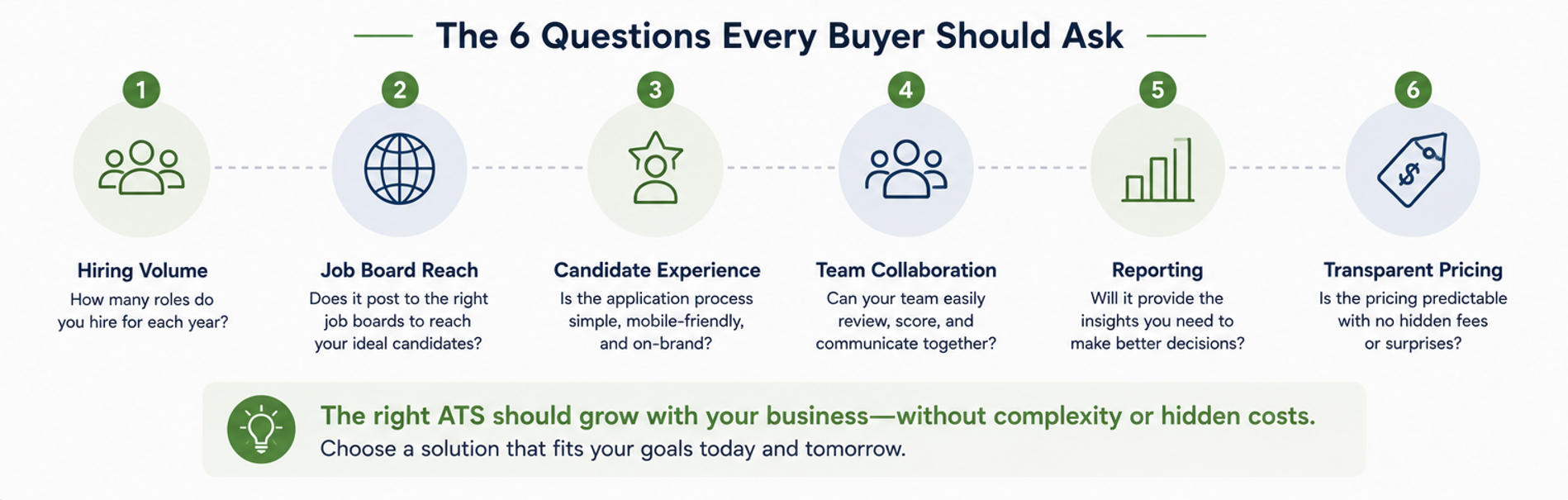
Factor #1: Job Board Integration & Automated Posting
Your ATS should serve as a central hub for distributing job postings across multiple channels. Look for comprehensive job board integration that covers both major platforms (Indeed, LinkedIn, ZipRecruiter, Monster, Glassdoor) and niche boards specific to your industry. The best systems offer true one-click posting. Simply create your job once and push it to dozens of sites simultaneously.
Multiposting software capabilities extend beyond simple distribution. Advanced features include scheduling posts for optimal visibility, automatically archiving expired listings, and tracking which boards generate the most qualified candidates. For example, NinjaGig enables posting to “top job boards like Indeed, ZipRecruiter, and Monster with one click,” eliminating the tedious copy-paste process across multiple platforms.
A custom-branded career portal represents another crucial integration point. Your ATS should provide a professional, mobile-responsive careers page that reflects your employer brand. Candidates should be able to browse openings and apply without leaving their digital environment. Features like custom application questions, employee testimonials, and company culture videos help attract candidates who align with your values.
Don’t overlook internal integrations with your existing tech stack. Your ATS should connect seamlessly with your HRIS/HRMS, background check vendors, assessment tools, and communication platforms. Look for systems offering Indeed Apply integration. Indeed reports that jobs using their Apply-with-ATS feature are 2.5 times more likely to result in a hire, making it important that your ATS integrates seamlessly with Indeed and other platforms.
Sample questions to ask vendors:
- Which job boards are included in the base package, and which require additional fees?
- Can the system handle posting to industry-specific or local job boards?
- How does the career portal handle mobile applications?
- What HRIS platforms do you integrate with, and how deep is the integration?
- Do you offer an open API for custom integrations?
Factor #2: Application Management & Candidate Experience
At its core, an ATS must excel at managing applications efficiently while delivering an exceptional candidate experience. Start with the candidate database search capabilities. You need robust filtering options by skills, education, location, source, and custom tags to quickly identify qualified candidates from your talent pool.
Resume parsing technology should accurately extract and standardize information from various resume formats, automatically populating candidate profiles. This feature saves hours of manual data entry while ensuring consistency. Advanced systems utilize AI-powered parsing, which improves accuracy over time.
Prescreen questions serve as your first line of defense against unqualified applicants. Configure knockout questions that automatically filter candidates based on essential requirements, such as certifications, location, or minimum experience. NinjaGig, for instance, supports custom prescreen questions that “filter out unqualified applicants automatically,” saving recruiters from reviewing irrelevant applications.
Modern ATS platforms include candidate-ranking algorithms that score applicants based on job requirements, skill matches, and other criteria you define. While not replacing human judgment, these tools help surface the most promising candidates first. Look for systems that allow manual overrides and adjustments to ranking criteria.
Automated candidate communications maintain engagement throughout the hiring process. Essential features include customizable email templates, automated status updates, SMS capabilities, and bulk messaging tools. The system should log all communications in the candidate’s profile for complete visibility.
Collaboration features transform hiring from a solo activity to a team sport. Look for capabilities like:
- Shared candidate notes and feedback forms
- @mention functionality for HR team discussions
- Interview scheduling with calendar integration
- Customizable evaluation scorecards
- Role-based permissions for different team members
Finally, ensure that the ATS can be integrated into your specific workflow. If different departments have unique hiring processes, the system should accommodate multiple pipelines with customizable stages. The ability to move candidates through stages with simple drag-and-drop functionality keeps the process intuitive and efficient.
Factor #3: Dashboards & Recruiting Analytics
Data-driven recruiting requires comprehensive analytics capabilities. The best ATS should provide real-time visual dashboards that display key performance indicators at a glance, allowing you to quickly assess your team’s progress. Essential metrics include time-to-hire rates by position, source-of-hire effectiveness, pipeline velocity, and conversion rates at each stage.
Look for systems offering both pre-built and custom reports. Standard reports might cover pipeline status, diversity metrics, and cost-per-hire calculations. Custom reporting capabilities let you answer specific questions unique to your organization. The ability to schedule automated report delivery ensures that stakeholders remain informed without requiring manual effort.
Source-of-hire reports reveal which channels deliver the best candidates, enabling smarter investment decisions. If LinkedIn generates higher-quality applicants than generic job boards, you can adjust your spending accordingly. Similarly, tracking the success rates of new employee referrals might justify expanding your referral program.
Advanced analytics should extend beyond basic metrics. Look for predictive capabilities that forecast hiring timelines based on historical data. Heat maps that show bottlenecks in your application process, such as phone screens taking too long or offers being delayed, highlight opportunities for improvement.
Data export functionality ensures you’re not locked into the vendor’s reporting tools. Whether you need CSV exports for further analysis or API access for real-time insights and data feeds to business intelligence platforms, flexibility matters. Some organizations feed ATS data into comprehensive people analytics platforms for enterprise-wide insights.
Utilize these insights to continually refine and optimize your hiring process. If data shows certain interview stages add little value, eliminate them. If specific job boards consistently underperform, reallocate the budget accordingly. The goal is to create a virtuous cycle in which data drives decisions that lead to better candidate sourcing results.
Factor #4: Compliance & Data Security
With data breaches making headlines and global privacy regulations tightening, ATS data encryption and security features deserve serious attention. A key feature of your chosen system must be the protection of sensitive candidate information while ensuring compliance with relevant regulations.
For organizations subject to GDPR, look for built-in privacy controls. The system should obtain explicit consent from candidates, provide easy data export for portability requests, and enable complete data deletion upon expiration of retention periods.
Equal Employment Opportunity Compliance (EEOC) reporting capabilities help U.S. employers track and report on diversity metrics while maintaining individual privacy. The ATS should collect voluntary self-identification data but prevent hiring teams from accessing it during the evaluation process. For federal contractors, Office of Federal Contract Compliance Programs (OFCCP) audit support becomes essential, with features to generate required reports and maintain compliant records.
Security features to evaluate include:
- Role-based access controls with granular permissions
- Detailed audit trails showing who accessed what data and when
- Cloud security certifications (SOC 2, ISO 27001)
- Data encryption both in transit and at rest
- Regular security updates and vulnerability testing
- Clear data residency and backup policies
Create a checklist for legal and IT stakeholders covering your specific compliance requirements. Include industry-specific regulations, state privacy laws, and internal security policies. Having IT and legal teams involved early prevents last-minute vetoes and ensures smooth implementation.
Factor #5: Ease of Use & Implementation
The most feature-rich ATS fails if your HR team won’t use it. Prioritize user-friendly ATS interfaces that reduce training time and encourage adoption. During demos, have actual users or HR professionals test common tasks and the overall user interface, such as posting jobs, reviewing applications, and scheduling interviews, to make informed decisions and gauge intuitiveness and overall candidate quality.
Evaluate the vendor’s onboarding support model carefully. Top providers offer dedicated customer success managers, structured implementation plans, and comprehensive training materials to support their clients. Look for multiple learning formats: live webinars, recorded tutorials, knowledge bases, and in-app guidance.
Consider the ATS implementation timeline realistically. While cloud-based systems can technically go live quickly, successful adoption requires thorough planning, effective data migration, and comprehensive team training. Typical timelines range from 2 to 4 weeks for basic setups to 2 to 3 months for complex implementations with multiple integrations.
A mobile recruiting app extends productivity beyond the desktop. Recruiters should be able to review candidates, provide feedback, and advance applicants through the pipeline from their mobile devices. Equally important, ensure the candidate experience remains smooth on mobile devices. Over 70% of job seekers use mobile devices during their search.
Scalability considerations include:
- Performance with high application volumes
- Support for multiple locations and languages
- Ability to handle seasonal hiring spikes
- User license flexibility as your team grows
- Feature expansion without platform migration
Factor #6: Cost, Pricing Models & Total Ownership
Understanding ATS pricing models helps you compare options accurately and avoid budget surprises. Common structures include subscription-based pricing (with monthly or annual fees tiered by company size or user count) and pay-per-job models, which charge for each open position posted.
Many vendors offer unlimited job postings as part of their subscription, which is a significant advantage for high-volume hiring. NinjaGig, for example, includes unlimited postings, allowing organizations to “post as many job openings as needed without additional costs.” This predictable pricing helps with budget planning.
Watch for hidden ATS costs that inflate the total price of a standalone ATS:
- Implementation and setup fees
- Data migration services
- Premium support packages
- Additional user licenses
- Integration costs for proper ATS functionality
- Advanced features as add-ons
- SMS or email credits
To calculate ATS ROI, quantify both cost savings and efficiency gains to hit recruitment goals. If an ATS solution reduces time-to-hire by 20% and your average role costs $5,000 per week unfilled, the math becomes compelling. Factor in reduced staffing agency fees, improved quality of new hire, and decreased administrative burden within the hiring pipeline for a complete picture.
Negotiation tips and contract checkpoints:
- Request multi-year discounts while avoiding long-term lock-ins
- Clarify what happens to your data if you leave
- Understand renewal terms and price escalation clauses
- Negotiate implementation support into the base price
- Ensure service level agreements match your needs
The Ultimate ATS Selection Checklist
Use this comprehensive ATS evaluation checklist to systematically compare vendors:
Integration Capabilities:
- Covers major job boards (Indeed, LinkedIn, ZipRecruiter)
- Supports one-click multiposting
- Includes a branded career portal
- Integrates with existing HRIS/HRMS
- Offers API access or marketplace integrations
Core Features of ATS systems:
- Accurate resume parsing
- Advanced search and filtering of candidate data
- Candidate ranking/scoring
- Automated communications
- Collaborative hiring tools
- Customizable workflows
Analytics & Reporting:
- Real-time dashboards
- Standard and custom reports
- Data export capabilities
- Source effectiveness tracking
- Predictive analytics (bonus)
Compliance & Security:
- GDPR/privacy compliance tools
- EEOC/OFCCP reporting
- Role-based permissions
- Audit trail functionality
- Security certifications
Usability & Support:
- Intuitive interface
- Mobile capabilities via mobile apps
- Quality training resources
- Responsive customer support and dedicated account managers
- Regular product updates
How to Weight Criteria Based on Business Priorities:
Assign point values to each category based on your organization’s specific needs. High-volume recruiters might weigh automation features heavily, while heavily regulated industries prioritize compliance tools. Create a scoring matrix where each vendor receives points multiplied by your weighting factors.
Shortlisting & Ranking Vendors
Begin by compiling an initial list of 8-10 potential vendors through market research and peer recommendations. Apply quick filters based on your must-have requirements, such as budget range, essential integrations, or industry focus, to narrow down the list to 3-5 finalists for deeper evaluation.
When scheduling demos, prepare real-world scenarios that reflect your actual hiring challenges. Ask vendors to demonstrate how their system addresses your specific use cases, rather than watching generic presentations. Include multiple team members in demos to gather diverse perspectives.
Use weighted scoring to objectively rank finalists. Assign importance weights to each evaluation criterion, score vendors on a consistent scale, then calculate weighted totals. This method prevents any single impressive feature from overshadowing the overall fit.
Conduct reference checks with current customers in similar industries or companies of a similar size. Ask specific questions about implementation experiences, ongoing support quality, and whether they’d choose the same vendor again. Pay attention to any hesitation or qualified responses.
Frequently Asked Questions
How long does a typical setup take?
A basic implementation can be completed in 2-4 weeks for cloud-based systems. However, plan for 60-90 days for full deployment, including integrations, training, and process optimization.
Can an ATS integrate with our legacy HRIS?
Most modern ATS platforms offer integration capabilities through APIs or pre-built connectors. During demos, test the specific integration with your HRIS to verify data flow works smoothly.
What data is needed to migrate from spreadsheets?
Typically, you’ll need candidate contact information, resume files, application dates, and current status. Most hiring software vendors provide migration templates and support services to ensure accurate data transfers.
How often are updates released, and what are their associated costs?
Cloud-based ATS recruitment software typically includes regular subscription price increases, with major releases issued quarterly and minor updates issued monthly. Verify that updates won’t disrupt your workflows or require retraining.
How does your chosen ATS improve diversity hiring?
Features like blind resume screening, structured interview guides, and diversity analytics help reduce unconscious bias while providing data to track and improve inclusive hiring practices.
Conclusion & Next Steps

Choosing the right ATS represents a pivotal decision that impacts every aspect of your talent acquisition and hiring strategy. The platform you select will shape candidate and new hire experiences, determine recruiter efficiency, and influence your ability to compete for top talent in an increasingly competitive market.
Use the comprehensive checklist and scorecard framework provided in this guide to maintain objectivity throughout your evaluation process. Remember that the best ATS for your organization strikes a balance between powerful features, usability, integrations, independence, and comprehensive capabilities, all at a reasonable cost.
As you move forward, focus on finding a partner, not just a vendor. The right ATS provider will support your growth, adapt to your changing needs, and continuously innovate to keep you ahead of hiring trends within the recruitment process.
Book Your Personalized ATS Demo
Ready to see an ATS software in action? Book a 30-minute live demo with our product experts and discover how streamlined recruiting can transform your hiring results. During your personalized session, we’ll focus on your specific hiring challenges and show exactly how the right applicant tracking system can solve them. Schedule my demo now
ATS Vendor Comparison Scorecard (Free Download)
Want to shortcut your evaluation process? Enter your email to instantly download the ATS Vendor Comparison Scorecard and start ranking solutions today. With categories for features, pricing, support, and integrations already configured, you’ll make confident decisions backed by data.
Get the free scorecard
One last tip: when you’re comparing vendors, customer reviews tell you more than feature lists. You can read NinjaGig’s reviews from small business owners as one data point.