
If you’re still manually posting jobs to multiple boards and tracking candidates in spreadsheets, you’re burning time and money. Applicant tracking systems (ATS) now power hiring at 99% of Fortune 500 companies, and for good reason: they cut hiring time by up to 60% while improving candidate quality.
But here’s what matters: understanding how applicant tracking systems work isn’t just academic curiosity. It’s the difference between hiring top talent in days versus losing them to faster competitors. Whether you’re evaluating your first ATS or optimizing an existing system, this guide breaks down exactly how these platforms transform chaotic hiring into a streamlined, data-driven process.
We’ll walk through each step of the ATS workflow, from automated job posting to final hire, with real metrics and examples that show why recruitment automation has become non-negotiable for competitive hiring. By the end, you’ll know precisely how an ATS can solve your specific hiring challenges and which features actually move the needle on hiring outcomes.
What Is an Applicant Tracking System?
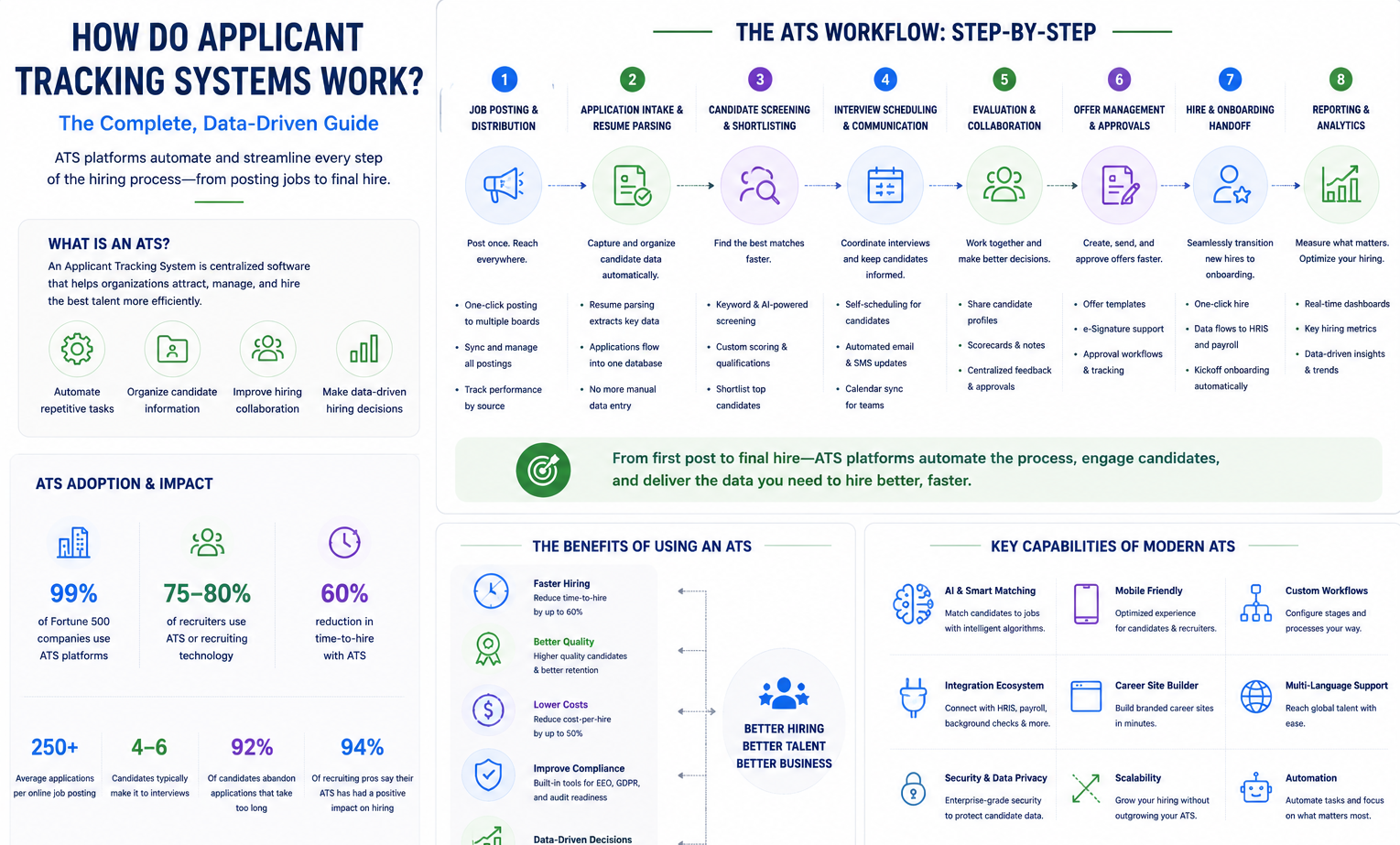
An applicant tracking system is specialized HR technology that manages your entire recruiting workflow in one centralized platform. Think of it as command central for hiring: instead of juggling emails, spreadsheets, and multiple job boards, everything flows through one system.
At its core, ATS software automates the administrative heavy lifting that bogs down recruiting teams. It posts jobs across multiple boards simultaneously, collects and organizes applications, tracks candidates through each hiring stage, and provides data on what’s working. The best way to understand an ATS? It’s like having a highly organized assistant who never sleeps, never loses a resume, and can instantly tell you exactly where every candidate stands in your process.
Modern hiring platforms go beyond basic tracking. They parse resumes automatically, score candidates against job requirements, coordinate interview scheduling, and even handle offer letters. For example, when a candidate applies through Indeed, LinkedIn, or your company website, the ATS automatically captures their information, parses their resume into searchable fields, and notifies the hiring team. No more manual data entry or lost applications.
The result? What used to take hours now takes minutes. Instead of administrative tasks eating 70% of your recruiting time, you focus on what matters: evaluating and engaging top candidates. That’s why an applicant tracking system, explained simply, means turning chaos into clarity through intelligent automation.
Market Adoption & Industry Statistics
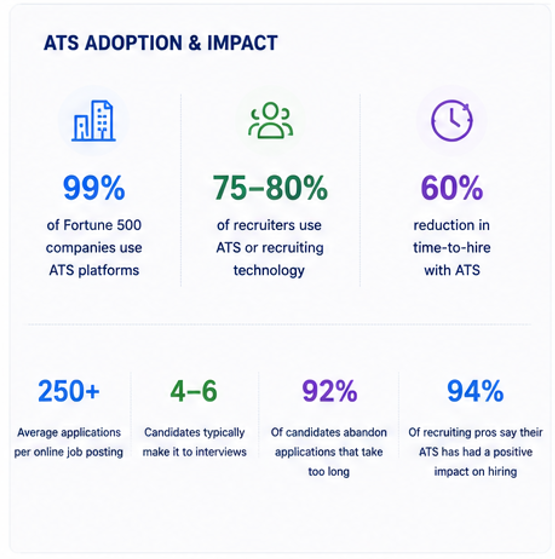
The numbers tell the story: ATS adoption rates have reached critical mass. Currently, 99% of Fortune 500 companies use ATSs as standard practice, relying on them for virtually every hire. But it’s not just enterprise companies using ATS. Approximately 75-80% of all recruiters now use some form of ATS or recruiting technology.
Here’s where it gets interesting: while large companies have near-universal adoption, only about 20% of SMB hiring tools include full ATS capabilities. This gap represents massive untapped potential for smaller businesses to level the playing field. The recruiting statistics show why this matters:
- Average online job posting receives 250+ applications
- Only 4-6 candidates typically make it to interviews
- Manual screening of 250 resumes can take 20-40 hours
- 92% of candidates abandon applications that take too long
The business impact is clear. Companies using an ATS report a higher rate of high-quality candidates than those using traditional methods. Additionally, 86% of recruiters say their ATS reduced time-to-hire, while 79% report improved hire quality. When 94% of recruiting professionals say their ATS has had a positive impact on hiring, it’s clear this isn’t just a nice-to-have tool, but it’s become essential infrastructure for competitive hiring.
Step-By-Step: How Applicant Tracking Systems Work
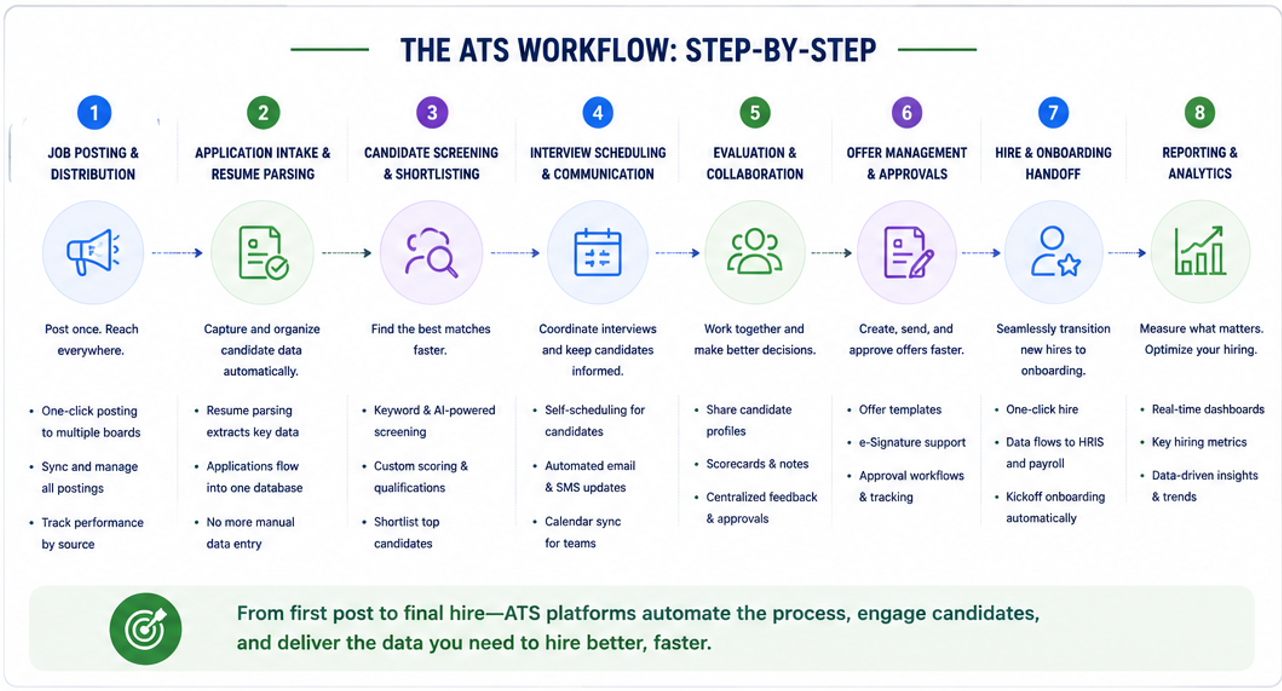
1. Job Posting & Multi-Board Distribution
The hiring process starts with getting your job in front of candidates, and this is where multi-posting ATS capabilities shine. Instead of logging into each job board separately, modern ATS platforms feature a one-click job posting that distributes your opening across multiple channels simultaneously.
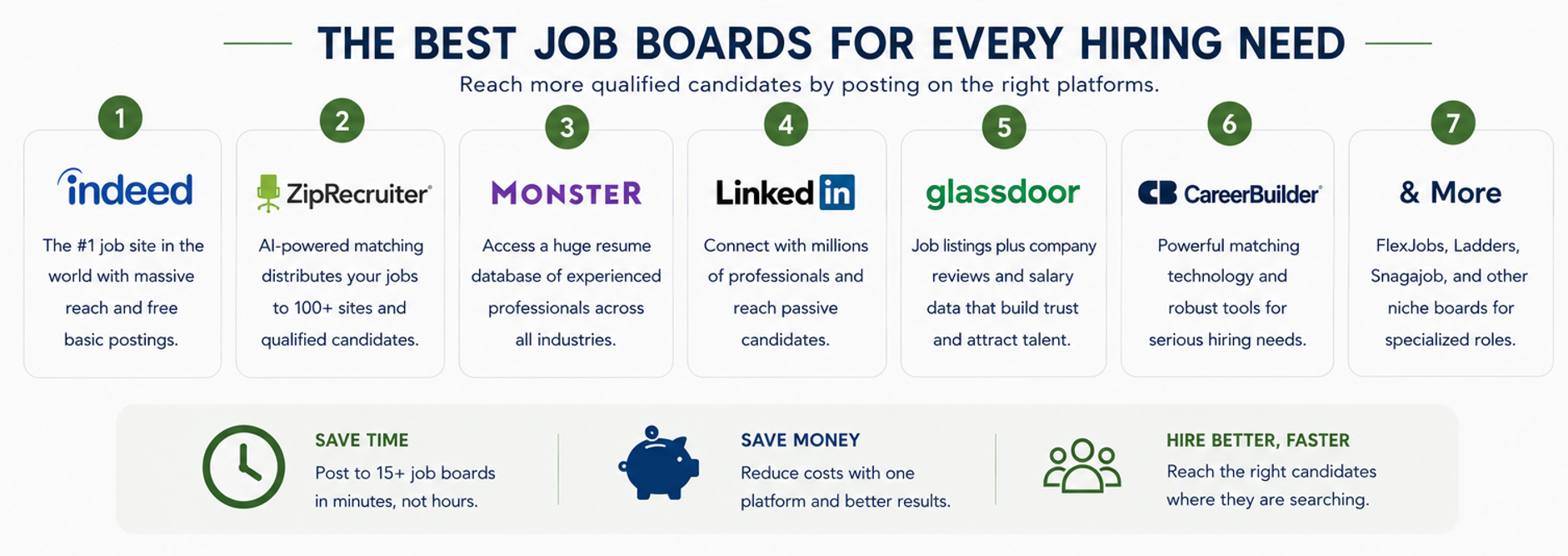
Here’s how ATS job distribution actually works: You create your job posting once in the system, including all requirements, descriptions, and screening questions. The ATS then automatically formats and posts this job to your selected channels, including Indeed, LinkedIn, ZipRecruiter, Monster, niche job boards, and your company’s careers page. For example, NinjaGig‘s platform posts to 14 job sites with one click, eliminating hours of redundant data entry.
But the real power comes from job board integration that goes beyond simple posting. The ATS maintains live connections with these platforms, meaning:
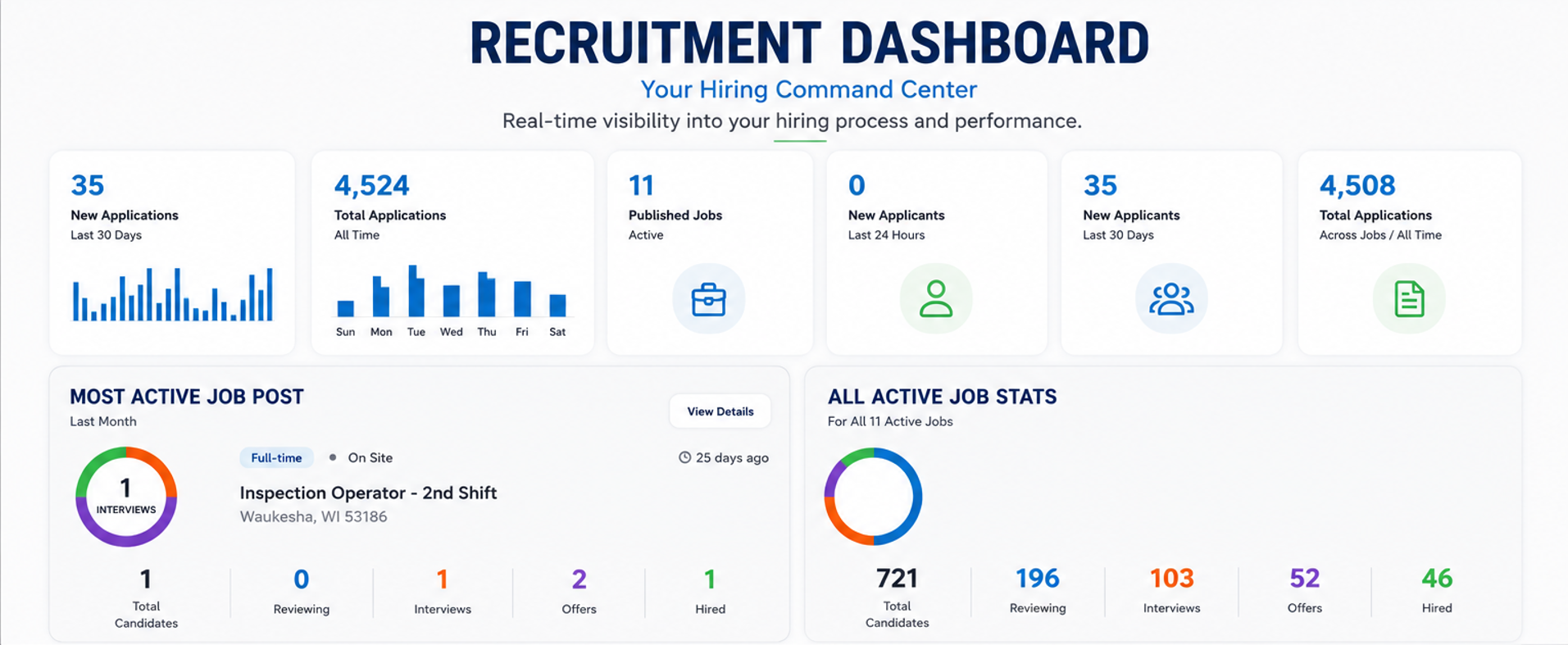
- Applications from all sources flow into one unified dashboard
- You can pause or edit postings across all boards from one interface
- The system tracks which sources deliver the best candidates
- Built-in analytics show cost-per-applicant by channel
This integrated approach saves more than time. It also saves money. Instead of paying separate posting fees or maintaining multiple job board subscriptions, many ATS platforms include job distribution in their base pricing. You post once, reach everywhere, and track everything.
2. Application Intake & Resume Parsing
Once your job goes live, applications start flowing in from multiple sources. This is where resume parsing software becomes critical. Without it, you’d be manually entering data from hundreds of resumes.
Modern ATS resume readers use sophisticated parsing technology to automatically extract and organize candidate information. When a resume arrives (whether PDF, Word doc, or LinkedIn profile), the system identifies and captures:
- Contact information and location
- Work history with dates and titles
- Educational background and certifications
- Skills and competencies
- Professional summary or objective
This parsed data immediately becomes searchable, structured candidate data in your talent database. Instead of opening 250 individual PDFs to find candidates with specific skills, you simply search your database for “JavaScript” or “MBA” and instantly see all matches. The original resumes remain attached to each profile for detailed review, while the heavy lifting of data extraction is automated.
The accuracy of modern parsing technology typically exceeds 95%, meaning minimal cleanup work. Plus, candidates can apply from any device without having to reformat their resumes. The ATS handles various formats seamlessly. This creates a better candidate experience while building your searchable talent pool for current and future positions.
3. Screening, Filtering & Ranking
With hundreds of applications in your database, finding qualified candidates becomes the next challenge. This is where ATS screening capabilities separate good systems from great ones. Instead of manually reviewing every application, the system uses keyword matching and scoring algorithms to surface your best candidates.
Here’s how candidate scoring typically works: The ATS compares each application against your job requirements, looking for specific keywords, skills, experience levels, and qualifications. Candidates who match more criteria score higher and rise to the top of your list. Some systems assign numerical scores (like 85/100), while others use star ratings or simple match percentages.
Modern AI recruiting tools take this further by learning from your hiring patterns. They identify which candidate attributes correlate with successful hires at your company, then adjust scoring accordingly. For instance, if your best sales reps tend to have SaaS experience and specific certifications, the system learns to weight these factors more heavily.
The filtering capabilities let you instantly narrow your candidate pool:
- Show only candidates with required certifications
- Filter by years of experience or education level
- Exclude candidates outside your geographic range
- Focus on those who answered screening questions correctly
This systematic approach means the 250 applications for your position quickly become a manageable list of 20-30 qualified candidates. You spend time evaluating strong candidates rather than wading through unqualified applications. It’s why recruiters now use AI or automation in their ATS for candidate filtering.
4. Interview Scheduling & Candidate Communication
Moving qualified candidates through your process requires constant communication, and this is where interview scheduling software integrated into your ATS saves massive time. Instead of playing email tag to coordinate interviews, the system automates most communication touchpoints.
ATS email templates handle routine messages like application confirmations, interview invitations, and status updates. You can create templates for every stage:
- Application received confirmation
- Moving to phone screen
- Scheduling in-person interviews
- Request for additional information
- Position filled notifications
But here’s where it gets powerful: bulk messaging capabilities let you update multiple candidates simultaneously. Rejecting 200 unqualified applicants? One click sends personalized rejection emails to all of them. Need to schedule five phone screens? The system can send calendar invites with available time slots, letting candidates self-schedule.
The impact on candidate experience is significant. Instead of wondering about their application status, candidates receive timely updates throughout the process. They can easily schedule interviews without back-and-forth emails. This professional communication reflects well on your employer brand and keeps top candidates engaged. Remember, candidates will abandon applications with poor communication. Luckily, automation prevents this from happening.
5. Collaboration & Hiring Pipeline Management
Hiring is a team sport, and your ATS serves as the coordination hub. The hiring workflow features ensure everyone stays aligned on candidate evaluations and process steps.
Within the team collaboration ATS, each candidate moves through defined pipeline stages: Applied → Screening → Phone Interview → In-Person Interview → Reference Check → Offer → Hired. Team members can see exactly where each candidate stands and what actions are needed next.
The real value comes from centralized feedback sharing. After each interview, team members log into the ATS to:
- Rate candidates on key competencies
- Leave detailed interview notes
- Flag concerns or strong points
- Vote on moving forward or passing
This eliminates the chaos of email chains and conflicting opinions. Everyone sees the same candidate information, reviews the same feedback, and makes decisions based on complete data. Hiring managers can quickly see which candidates have unanimous support and which have mixed reviews. The system also tracks who has and who hasn’t submitted feedback, sending automatic reminders to keep the process moving.
6. Reporting, Analytics & Compliance
Recruiting analytics transform gut-feel hiring into data-driven decisions. Your ATS continuously collects data on every aspect of your hiring process, presenting it through dashboards and reports that highlight what’s working and what needs improvement.
Key time-to-hire metrics show how long each stage takes:
- Days from posting to first qualified candidate
- Average time in each pipeline stage
- Total days to fill by position type
- Bottlenecks causing delays
Source-of-hire reporting reveals which channels deliver high-quality candidates. You might discover that LinkedIn provides 40% of your hires despite receiving only 15% of applications, while an expensive job board sends lots of unqualified candidates. This data drives smarter budget allocation.
For Equal Opportunity Employment (EEO) compliance, the ATS automatically tracks required data on applicant demographics, disposition reasons, and hiring decisions. This creates an audit trail that demonstrates fair hiring practices and supports compliance reporting. The system can generate EEO-1 reports, track diversity metrics, and flag potential compliance issues before they become problems.
Additional analytics include offer acceptance rates, candidate drop-off points, recruiter activity levels, and cost-per-hire calculations. This data enables continuous improvement because you’re not just filling positions, you’re optimizing your entire talent acquisition strategy.
Key Benefits of Using an ATS
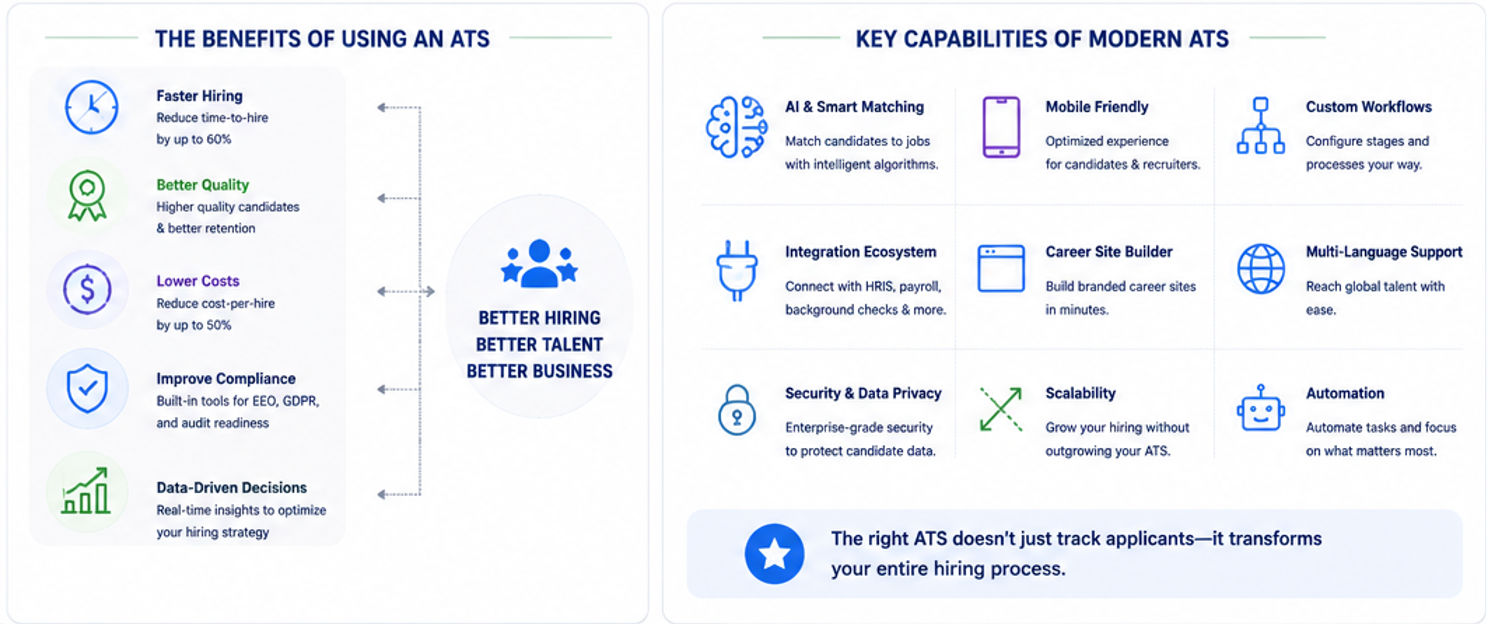
The ATS benefits extend far beyond basic organization. Let’s look at the measurable impact on your hiring outcomes.
Reduce time to hire dramatically. Studies show ATS users cut hiring time by an average of 60%. This speed matters: top candidates remain available for only 10 days on average. Manual processes simply can’t compete.
You’ll improve candidate quality through better screening and wider reach. ATS users may see up to 62% more high-quality candidates than with manual methods. Why? The system ensures you never miss qualified candidates buried in your inbox, while automated screening surfaces the best matches first.
The recruitment ROI is compelling. Consider the cost of one bad hire: recruiting expenses, training investment, lost productivity, and eventual replacement costs often total 30% of the position’s annual salary. An ATS pays for itself by preventing just one or two bad hires per year. Add in time savings, reduced job board costs, and improved retention from better candidate matching, and the financial case becomes overwhelming.
Beyond metrics, an ATS transforms recruiting from reactive to strategic. Instead of drowning in administrative tasks, recruiters focus on relationship building, candidate engagement, and strategic workforce planning. It’s the difference between being a paper pusher and a talent advisor.
Common ATS Myths & FAQs
Let’s address the ATS myths that keep companies from modernizing their hiring:
Myth: The “resume black hole.” Many believe ATS systems automatically reject good candidates.
Reality: The ATS doesn’t reject anyone; rather, it ranks and organizes based on criteria that you set. If qualified candidates aren’t surfacing, the issue is usually poorly written job requirements or overly restrictive filters.
Myth: ATS compatibility requires special formatting.
Reality: While early systems struggled with creative formats, modern ATS platforms handle virtually any resume format. Candidates don’t need plain-text resumes or special keywords, as parsing technology has evolved significantly.
Common applicant FAQs:
- “Will my resume get through?” Yes, if you meet the basic requirements
- “Should I keyword stuff?” No, write naturally about your experience
- “Do graphics cause problems?” Modern systems handle them fine
- “How do I stand out?” Focus on relevant experience and clear communication
The truth is simple: an ATS is a tool that amplifies human decision-making, not replaces it. Used properly, it ensures every qualified candidate gets fair consideration while filtering out obviously unqualified applications. It’s about efficiency, not elimination.
Best Practices to Optimize Your ATS Results
To optimize ATS settings for maximum impact, start with your job descriptions. Include specific, searchable job description keywords that qualified candidates will naturally have in their backgrounds. Instead of “marketing ninja,” use “digital marketing manager with Google Ads experience.” Clear requirements lead to better matches.
Develop a candidate nurture strategy using your ATS communication tools. Set up automated email campaigns that keep silver-medal candidates engaged for future opportunities. Send monthly updates about company news, new openings, or industry insights. When the perfect role opens, you have warm leads ready to engage.
Build your talent pool management process systematically:
- Tag strong candidates who weren’t quite right for specific roles
- Create talent pools by skill set (e.g., “Senior Developers,” “Sales Leaders”)
- Set reminders to check in with high-potential candidates quarterly
- Track which sources provide candidates worth pooling for future roles
Use analytics to continuously improve. If certain job boards send unqualified candidates, stop using them. If phone screens reveal consistent gaps between resume claims and actual skills, adjust your screening questions. The ATS provides the data, and by acting on it, you drive results.
Buying Considerations & Feature Checklist
When choosing an ATS, focus on features that address your specific pain points. Essential ATS features include:
- Multi-board posting to major job sites
- Resume parsing with 95%+ accuracy
- Customizable pipeline stages
- Email templates and bulk messaging
- Basic reporting on key metrics
- Mobile-friendly candidate experience
- Integration with your email/calendar
Understand pricing models before committing. Some charge per job posting, others per user, and others offer unlimited usage for a flat fee. Calculate total cost including implementation, training, and any add-on features. For small businesses, platforms like NinjaGig offer unlimited job postings at the base price, helping avoid surprise costs as you scale.
Implementation tips for smooth rollout:
- Start with one department or job type as a pilot
- Import historical candidate data to build your initial database
- Train all users on basic features before adding advanced functionality
- Establish clear processes for each pipeline stage
- Monitor adoption and address resistance quickly
Remember: the best ATS is the one your team will actually use. Prioritize user experience and essential features over bells and whistles.
Conclusion & Next Steps
Understanding how applicant tracking systems work reveals why they’ve become essential hiring infrastructure. From automated job distribution to intelligent candidate screening, every feature addresses a specific recruiting pain point. The data is clear: companies using an ATS hire faster, find better candidates, and spend less money doing it.
Your next steps with ATS depend on where you are today. If you’re still using spreadsheets and email, it’s time to start with the basics of an ATS. Even a simple system will transform your hiring. If you have an ATS but aren’t seeing results, focus on optimization: better job descriptions, refined screening criteria, and actually using the analytics.
The path to improve hiring isn’t complicated. Pick an ATS that matches your needs, implement it properly, and let automation handle the administrative burden. You’ll spend less time on paperwork and more time on what matters: building relationships with great candidates and making strategic hiring decisions. In a market where the best talent disappears in days, that speed and focus make all the difference.
Ready to see an ATS in action? Book a 15-Minute Demo and discover how you can cut time-to-hire by 60%.
Want to make the right choice? Enter your email to download The Ultimate ATS Buyer’s Checklist (PDF) – a 12-point checklist that saves you hours of research and ensures you pick the perfect applicant tracking system for your business.