

Here’s a reality check: 97.8% of Fortune 500 companies use an applicant tracking management system (ATS), and roughly 94% of recruiters report improved hiring after deployment. That’s not just corporate fluff; it’s a clear signal that structured hiring systems work, even (especially) for lean teams.

Manual spreadsheets kill productivity within the hiring process. Lost resumes waste time. Slow response times cause top candidates to lose interest to competitors. These aren’t minor inconveniences; they’re deal-breakers when you’re competing for talent and job seekers against companies with dedicated recruiting teams.
An applicant tracking system solves these problems by centralizing qualified candidate data, automating repetitive tasks, and providing clear visibility into your hiring and recruitment processes. Core features include resume parsing, pipeline management, automated communications, and performance analytics.
This guide covers the essential best practices for configuring your applicant tracking system (ATS): building effective pipelines, defining clear statuses, implementing smart tagging, leveraging dashboards for insights, and maintaining clean data. Master these fundamentals, and you’ll hire faster and smarter than teams ten times your size.
Why Every Lean Team Needs a Purpose-Built Pipeline
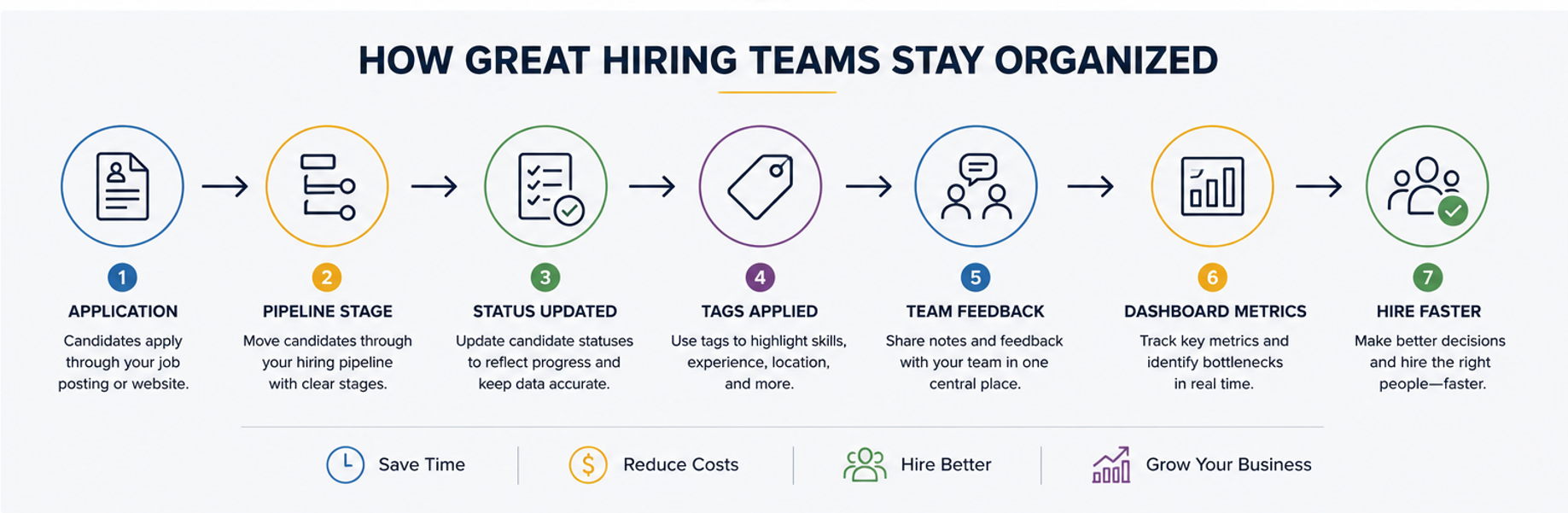
A hiring pipeline transforms your ad-hoc recruiting chaos into a repeatable, measurable process. Think of it as your qualified candidate funnel: a clear path from job opening to application to hire (or rejection) that everyone on your team understands.
Without a structured pipeline, you’re flying blind. With one, you gain instant visibility into where candidates stand, what actions are needed, and where bottlenecks occur. This directly impacts your time-to-hire metric. Companies with well-defined pipelines consistently fill job openings 30-40% faster than those without.
For founders and hiring managers in compact teams, pipeline visibility is crucial. You can’t afford to wonder whether that promising job applicant is awaiting an interview or if HR already extended an offer. A clear pipeline ensures nothing falls through the cracks and enables recruitment efficiency even when everyone wears multiple hats.
Step-by-Step: Building & Configuring Your Hiring Pipeline
Start by mapping your real-world workflow to ATS stages. Don’t copy generic templates; build custom pipeline stages that reflect how you actually hire the best candidates.
For a typical engineering role, your pipeline might include:
- Application Received
- Phone Screen Stage
- Technical Assessment Stage
- Culture Fit Interview
- Final Interview with Founder
- Offer Management
- Hired/Rejected
Sales roles might swap “Technical Assessment” for “Role Play Exercise,” while operations positions could include “Reference Check” as a dedicated stage. The key is matching your pipeline to reality.
Modern ATS platforms let you automate actions at stage transitions. When a candidate moves to “Phone Screen,” trigger an automatic email with scheduling links. When they reach “Technical Assessment,” auto-assign the coding challenge. These automation triggers save hours of manual coordination.
At pipeline entry, capture essential data: candidate source (job board, referral, LinkedIn), resume upload, and basic qualifications. This information feeds both your immediate screening needs and long-term analytics on which sources deliver quality hires.
Don’t forget to integrate assessments directly into your pipeline. Whether it’s a coding challenge for developers or a writing sample for marketers, building these into dedicated stages ensures consistent evaluation and prevents candidates from slipping through without proper vetting.
Defining Clear Applicant Statuses That Power Accurate Reporting
Here’s the difference between pipeline stages and candidate status codes: stages are macro (Interview), statuses are micro (Interview Scheduled, Interview Complete, Awaiting Feedback). This granularity powers ATS reporting accuracy.
Without detailed statuses, you can’t answer critical questions. How many candidates received offers? More importantly, how many were accepted rather than declined? If you only track “Hired” without “Offer Accepted vs. Offer Declined,” you’re blind to a crucial metric.
Important positive statuses include: Application Reviewed, Qualified for Next Round, Interview Scheduled, Reference Check Passed, Offer Extended, and Offer Accepted. Negative statuses are equally important: Not Qualified, No-Show to Interview, Failed Assessment, Offer Declined, Position Filled.
Common data-quality pitfalls destroy your recruiting metrics. Delayed status updates (marking someone “Hired” weeks after they accepted) skew time-to-hire calculations. Missing rejection reasons leave you guessing why candidates drop out. Update statuses immediately and include specific rejection codes to maintain data integrity.
Smart Tagging: The Secret to Fast Candidate Filtering
ATS tags are your secret weapon for managing large candidate pools with a compact team. While search helps you find keywords in resumes, tags enable instant candidate segmentation by skills, experience, location, or any attribute that matters to your hiring.
Tags beat search because they’re standardized and instant. Instead of remembering whether candidates listed “JavaScript,” “JS,” or “React Developer,” you apply consistent skill tags that make filtering bulletproof. Building a clear skills taxonomy from day one pays dividends as your candidate database grows.
Sample tag categories for a well-organized system:
- Technical Skills: Python, Salesforce Admin, AWS Certified
- Experience Level: Entry Level, Senior, Director+
- Location Preferences: Remote Only, Hybrid-Flexible, On-site Required
- Department: Engineering, Marketing, G&A
- Special Attributes: Security Clearance, Bilingual-Spanish, Startup Experience
Tag governance prevents chaos. Establish clear rules: tags must be specific (“Data Analyst” not “Data”), mutually exclusive (not both “Junior” and “Senior”), and follow consistent formatting (decide on “Front-End” vs “Frontend” upfront). Assign an owner to maintain the tag library and schedule quarterly cleanup to merge duplicates and retire obsolete tags. This discipline enables effective talent pooling for future roles.
Your ATS Dashboard: Turning Raw Data into Hiring Wins
Stop treating your ATS dashboard like a fancy spreadsheet. Modern platforms provide actionable intelligence that drives better hiring decisions if you know which metrics matter.
Critical dashboard widgets include pipeline overview (candidates by stage), bottleneck alerts (stages with unusual buildup), and funnel charts showing conversion rates. These visualizations instantly highlight where your process breaks down.
Five recruiting KPIs every startup team must track weekly:
- Time-to-fill: Days from job posting to accepted offer
- Source effectiveness: Which channels deliver hired candidates (not just applicants)
- Stage conversion rates: Percentage moving from application to screen to interview
- Offer acceptance rate: Reveals compensation competitiveness and candidate experience quality
- Funnel conversion rate: Overall application-to-hire ratio by role type
Set up custom reports for deeper insights. Create email digests delivered to your inbox every Monday with pipeline status and key metric changes. Most importantly, use data to drive decisions: if phone-screen conversion rates drop, review your screening criteria. If time-to-fill spikes, examine which stages cause delays. Dashboard data without action is just an expensive decoration.
Collaborative Hiring: Maximizing Seats, Permissions & Feedback Loops
Compact teams can’t afford hiring silos. Your collaborative ATS should serve as the single source of truth, where everyone (recruiters, hiring managers, interviewers) accesses the same, up-to-date candidate information.
Modern platforms enable this through role-based user permissions. Recruiters get full access, hiring managers see their team’s candidates, and interviewers view only assigned candidates. This structure maintains data security while enabling transparency.
Core collaboration features that multiply effectiveness include automated task assignments (interview scheduling lands directly on the calendar owner’s calendar), @mentions in shared interview notes (flag specific concerns for discussion), and structured scorecards that reduce bias by enforcing consistent evaluation criteria.
Pro tip: Choose an ATS that doesn’t nickel-and-dime on user seats. Ninja Gig, for instance, includes unlimited team seats at no extra cost, meaning your entire hiring committee can collaborate without budget concerns. When everyone has access, hiring team feedback flows naturally and decisions happen faster.
Data Hygiene: Keeping Your ATS Clean, Fast & Trustworthy
Poor data quality undermines everything else. Implement ATS data-cleanup practices from day one to maintain a system that actually helps, rather than hinders, your hiring.
Start with standardized fields and required entries. Phone numbers need consistent formatting. Dates must follow the same structure. Use dropdown menus instead of free text wherever possible. This prevents variations like “Software Engineer,” “Software Eng,” and “SWE” from fragmenting your data.
Schedule quarterly audits to purge duplicate candidates, archive stale requisitions, and update outdated tags. Set clear retention policies: candidates rejected 12 months ago probably shouldn’t clutter active searches. Many jurisdictions also require data deletion for GDPR compliance, another reason to maintain clean records.
Document your data standards in a simple guide. When new team members join, they should understand exactly how to enter candidate information. This consistent investment pays off through accurate reporting and fast candidate searches.
Future-Proofing: Automation & AI Enhancements for Small Teams

The AI recruiting tools of tomorrow are becoming today’s competitive advantages. Smart teams are adopting automation in ATS to multiply their effectiveness without adding headcount.
Current automation wins include resume parsing that extracts skills and experience without manual data entry, automated scheduling that eliminates email tennis, and candidate sourcing AI that identifies passive candidates matching your requirements.
Next-generation features gaining traction: chatbot screening for initial candidate qualification, predictive analytics forecasting offer acceptance probability, and AI-powered candidate matching that learns from your hiring patterns.
Build your automation roadmap strategically. Start with the highest-impact, lowest-risk features (automated scheduling), then gradually adopt more sophisticated tools (AI screening) as you validate their effectiveness. The goal isn’t to replace human judgment but to eliminate repetitive tasks, allowing your team to focus on high-value activities like relationship building and culture fit assessment.
Conclusion & 30-Day Action Plan
Effective ATS implementation for small teams boils down to six core practices: build pipelines matching your actual workflow, define granular statuses for accurate tracking, implement smart tagging for instant filtering, leverage dashboards for data-driven decisions, enable team collaboration through shared access, and maintain pristine data quality.
Your 30-day action plan to optimize the hiring process:
- Week 1: Map current hiring workflow and build custom pipelines
- Week 2: Define a comprehensive status library and implement a tagging system
- Week 3: Configure dashboard with five key metrics and set up weekly reports
- Week 4: Onboard all team members, establish data standards, and run the first cleanup audit
Next steps: Transform these practices into action. Start with your most problematic hiring workflow and apply these principles. The compound effect of organized pipelines, clear statuses, and clean data will transform your hiring efficiency within weeks, not months.
Related guides
- Applicant Tracking System Best Practices: Expert Guide for Faster, Fairer Hiring
- Recruitment Dashboard: The Ultimate Guide to Data-Driven Hiring
- Ultimate Guide to Applicant Tracking Systems for Hiring Managers
Running lean? NinjaGig is hiring software built for small teams — free team seats, shared pipelines, and nothing to configure.