

Applicant tracking systems have transformed from simple resume databases into sophisticated hiring platforms that the majority of Fortune 500 companies now rely on.
 Many employers use applicant tracking system (ATS) platforms to streamline the process of posting job openings and managing applications for various positions. Yet many organizations barely scratch the surface of their ATS capabilities, missing opportunities to slash time-to-hire and improve candidate quality.
Smart ATS implementation addresses critical hiring pain points: manual resume screening, candidate ghosting, compliance headaches, and data-blind decision-making.
ATS solutions help businesses operate more efficiently by automating job posting and connecting with job boards.
Many applicant tracking systems work by scanning and ranking applications to help employers identify the best talent for their open positions.
This best practices guide will help turn your ATS from a digital filing cabinet into a strategic hiring engine.
Applicant Tracking System Best Practices
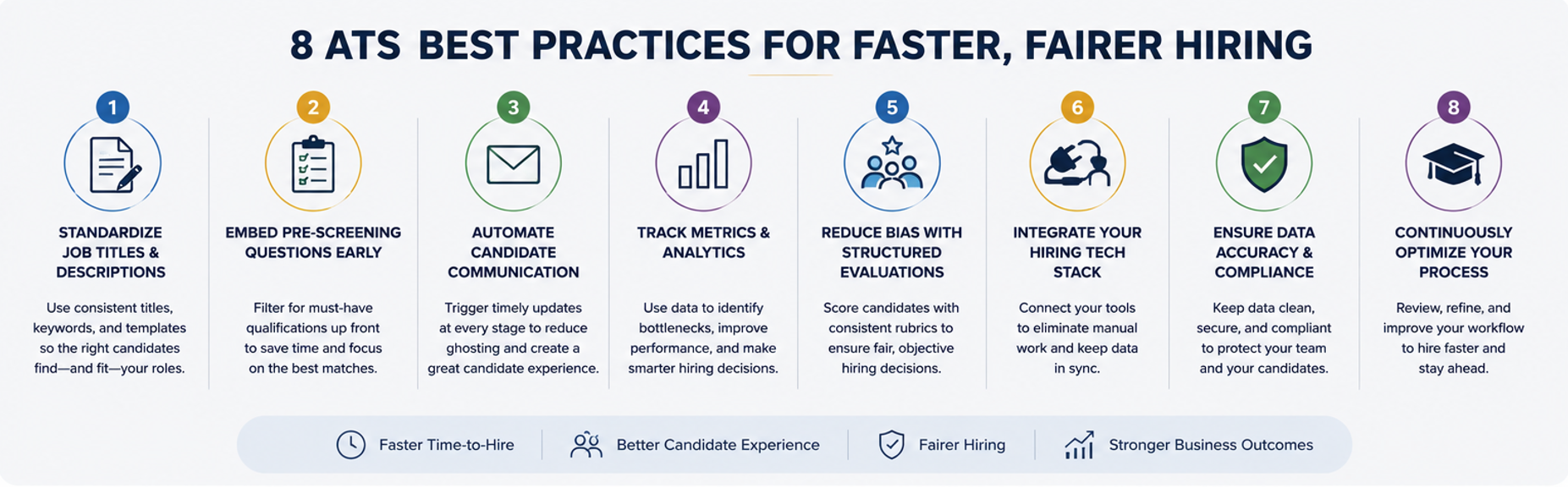
These eight proven strategies help hiring teams choose the right ATS and optimize their recruitment process for maximum impact, backed by real data and practical implementation tips. Leveraging analytics capabilities is essential for identifying strong candidates and efficiently filling open roles.
1. Standardize Job Titles & Descriptions
Using standardized keywords in job descriptions helps applicant tracking systems (ATS) match candidates to the right position and positions, ensuring the best fit for each role.
Standardization extends beyond titles. Consistent formatting, section order, and content structure help candidates quickly understand roles while improving ATS keyword matching.
Writing clear descriptions and using relevant keywords helps resumes pass ATS filters and allows the system to identify the best match.
Companies using standardized job templates report cutting weeks off recruiting cycles by eliminating confusion and streamlining the application process. ATS can review applications, rank candidates based on keyword matches, and track each applicant’s application history.
Implementation tips:
- Create a company-wide job title guide using industry-standard terms
- Build consistent job description templates with sections in the same order: role summary, responsibilities, qualifications, benefits
- Maintain 300-650-word descriptions using one consistent point of view
- Stick to standard formats and include sections for education, abilities, and interests
- Store approved templates in your ATS for instant access
Note: Advise candidates to submit or upload their resume as a Word document or compatible file type, and to complete all required fields to ensure their application is reviewed. Completing these steps increases the likelihood that the ATS will properly process the file and that the application will be considered.
2. Embed Job Application Pre-Screening Questions Early
Pre-screening questions act as your first line of defense against unqualified applications. By asking candidates to confirm essential requirements upfront, like certifications, years of experience, and work authorization, you can automatically filter out mismatches before they clog your pipeline.
Modern ATS platforms allow custom screening questions for each posting. When candidates answer “no” to must-have criteria on Indeed, the system can automatically reject or flag their application. This single feature can reduce time-to-review by up to 50% by ensuring only qualified candidates reach human reviewers, according to Hirevire.com
Strategic pre-screening also improves candidate experience. Clear qualification questions set expectations early, preventing wasted time for both parties. Track response patterns: if a quarter of applicants fail a specific question, consider whether it’s too restrictive or poorly worded.
Implementation tips:
- Identify 3-5 absolute must-haves for each role and convert them to yes/no questions
- Configure automatic rejection for deal-breaker responses
- Review screening question performance quarterly and adjust based on hiring manager feedback
- Test questions for clarity, ambiguous wording drives away good candidates
3. Automate Candidate Communication
Poor communication kills candidate experience. Many recruiting teams say candidates regularly ghost them, often because of delayed or confusing contact. Learn more in our guide to improving candidate experience with an ATS.
Your ATS should trigger automatic communications at every stage. Configure immediate application confirmations, status updates when candidates advance, interview reminders, and yes, even prompt rejections.
The system can also automatically request additional documents or information from candidates as needed. All communications are logged in the system for managers to review, ensuring transparency and accountability throughout the process.
Veteran talent acquisition lead Sowmiya Soundar shared on LinkedIn that 72% of dissatisfied candidates share negative experiences, which can damage your employer brand.
Essential automated touchpoints:
- Application received: Instant confirmation email reassuring candidates that their materials arrived
- Status changes: Automatic updates when moving between stages (under review, interview scheduled, etc.)
- Video interview invitations: Automated invitations or reminders for video interviews to streamline scheduling and preparation
- Post-interview: Follow-up messages with clear next steps and timelines
- Rejections: Polite, prompt closure that maintains goodwill for future opportunities
4. Track Metrics & Analytics
Your ATS generates valuable data at every step. Its analytics capabilities help streamline the hiring process and make recruitment more efficient for the business by providing real-time insights into every stage.
Hiring managers and recruiters use these analytics to make data-driven decisions, optimizing how candidates move through the hiring process.
Transform this information into actionable insights by monitoring key recruiting KPIs through dashboard reporting. Essential metrics include time-to-hire, cost-per-hire, source effectiveness, offer acceptance rates, and pipeline conversion at each stage.
Leading ATS platforms offer real-time dashboards showing active jobs, daily application volumes, and source performance. Use these tools to answer critical questions: Which channels deliver quality candidates? Where do strong applicants stall? Which roles consistently take too long to fill?
Analytics best practices:
- Configure dashboards for your top 5-7 metrics and review them weekly
- Share visual reports with stakeholders to demonstrate recruiting ROI
- Drilling into problem areas, like rising cost-per-hire, might reveal inefficient job board spending
- Use historical data to set realistic benchmarks and improvement goals
5. Build & Nurture Talent Pools
Your ATS candidate database represents years of recruiting effort. Don’t waste it. Archive all applicants (even rejections) to create searchable talent pools for future roles.
The ATS logs all candidate interactions and application history, making it easier to match candidates to open roles in the future. This practice serves dual purposes: speeding up future sourcing and meeting compliance requirements.
Many jurisdictions mandate keeping applicant records for 1-3 years to demonstrate fair hiring practices. Your ATS automates this retention while making past candidates instantly searchable. When similar roles open, search your database first. That silver medalist from six months ago might be perfect today.
Smart talent pool management extends beyond simple storage. Tag promising candidates by skills, maintain notes on their strengths, and run periodic re-engagement campaigns for passive talent.
Talent pool strategies:
- Set automatic retention policies aligned with legal requirements
- Tag candidates with skills, interests, and potential future fits
- Search archived resumes and application history before posting new jobs to match candidates to open roles
- Run quarterly campaigns to re-engage strong past applicants
6. Ensure Compliance & Data Security
Recruiting involves sensitive personal data, making security and compliance non-negotiable. Your ATS must support EEOC recordkeeping, GDPR data protection, and industry-specific regulations while maintaining bulletproof data security.
Modern ATS platforms provide built-in compliance features: audit trails that record every action taken in applications, role-based access controls that limit who sees what, and automated data retention/deletion based on legal requirements. These tools protect both candidates and your organization from discrimination claims or data breaches.
Compliance essentials:
- Enable audit logging to track all user actions
- Configure role-based permissions, limiting access to sensitive data
- Set automatic data retention and deletion policies
- Ensure your ATS vendor maintains security certifications and regular audits
7. Integrate ATS With Your HR Tech Stack

Isolated systems create inefficiencies and errors. Your ATS should seamlessly integrate with HRIS platforms, feature an intuitive user interface, include onboarding tools, background check services, interview scheduling software, and job boards for automated job posting. Proper integration eliminates duplicate data entry while enabling smooth handoffs between recruiting stages.
For example, when a candidate accepts an offer, their information should flow automatically from ATS to HRIS and onboarding systems.
Interview scheduling should sync with calendar applications. Background check results should be updated in candidate records without manual intervention. Hiring teams can also upload candidate files, such as resumes in PDF or DOCX format, directly into the ATS from integrated platforms, ensuring all relevant documents are accessible and compatible.
Evaluate integration options carefully. Native integrations typically offer better reliability than third-party connectors. Consider API availability for custom connections and ensure data mapping aligns between systems to prevent information loss.
Integration priorities:
- HRIS connection for seamless new hire data transfer
- Calendar integration enabling automated interview scheduling
- Job board APIs for one-click multi-channel posting and automated job board integration
- Assessment tools that feed results directly into candidate profiles
8. Continuous Optimization & A/B Testing
Recruiting evolves constantly. What worked last year might fail today. Build continuous improvement into your ATS workflow through regular testing and optimization.
Continuous optimization helps ensure your job ads pass ATS filters and attract candidates with genuine interest. Test different job ad copy, adjust screening thresholds, experiment with communication timing, then measure results.
Simple A/B tests can yield surprising insights. One company discovered that posting jobs on Tuesday mornings generated 35% more qualified applicants than posting on Friday mornings. Another found that shorter job descriptions (under 300 words) actually decreased quality despite increasing volume.
Testing opportunities:
- Job posting headlines and descriptions
- Pre-screening question wording and thresholds
- Communication templates and timing
- Application form length and required fields
- Test different ways to write job ads and employ new strategies
When completing A/B tests, consider which approaches resonate most with the person behind the application. This can help you optimize your process to better capture candidate interest and improve your chances of having your job ads pass ATS filters.
Conclusion
These ATS best practices transform recruiting from reactive scrambling into strategic talent acquisition. By standardizing processes, automating routine tasks, and leveraging data insights, you’ll cut time-to-hire while improving candidate quality and experience.
The key is systematic implementation. Start with one or two practices, measure results, then expand. Your ATS contains powerful capabilities; these strategies ensure you’re using them.
Ready to put these strategies to work? Book a free 15-minute ATS optimization consultation with our experts
Related guides
- Managing Your ATS in Small Teams: Best Practices for Pipelines, Statuses, Tagging, and Dashboard Tracking
- ATS Candidate Experience: How to Turn Your Hiring Process Into a Talent Magnet
- Recruitment Dashboard: The Ultimate Guide to Data-Driven Hiring
Put these best practices into play with an affordable ATS built for small businesses — unlimited job postings, every major job board, one dashboard.